BLE GATT Analysis
BLE GATT (Generic ATTribute) Profile defines how two BLE devices exchange bidirectionnal data over a dedicated connection.
Establishing a BLE Connection is useful anytime you need:
To send data from the Peripheral to the Central that exceeds the limit of Advertisements and Scan Responses of BLE Peripherals
To send encrypted data from the Central to the Peripheral, regarless of the size
To send data or commands from the Central to the Peripheral
Connecting with a BLE Dongle
When establishing a BLE Connection with BLE-YC01 using a generic BLE master (not the application) with default connection parameters that are quite energy-intensive:
The connection interval is about 8.5ms
The slave latency appears to be 0, since the Slave responds with an empty PDU at every connection interval
The timeout is 3s (checked in wireshark and also on the the BLE Central).

After a few seconds, the Slave (Peripheral) sends a request to update the connection parameters, likely because it has been configured to request these parameters when they are not already selected as such by the master:
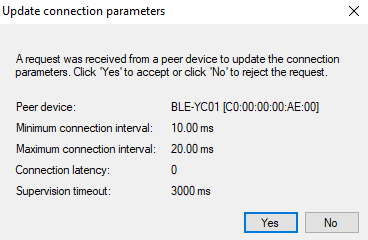
When this is accepted by the master, the connection interval is changed to 15ms:

This is still quite fast and we can see that the Slave Latency is still 0. This device is clearly vulnerable to high energy drain if left on and connected permanently with a remote Central.
Once connected with CySmart, we can discover the following services and characteristics:
Generic Access Service (0x1800)
Device Name
Appearance
Peripheral Preferred Connection Parameters
Generic Attribute Service (0x1801)
Service Changed
Unknown 16-bit Service UUID 0xFF01
Unknown Characteristic UUID 0xFF02 (Read / Write / Notify)
Unknown Characteristic UUID 0xFF10 (Read)
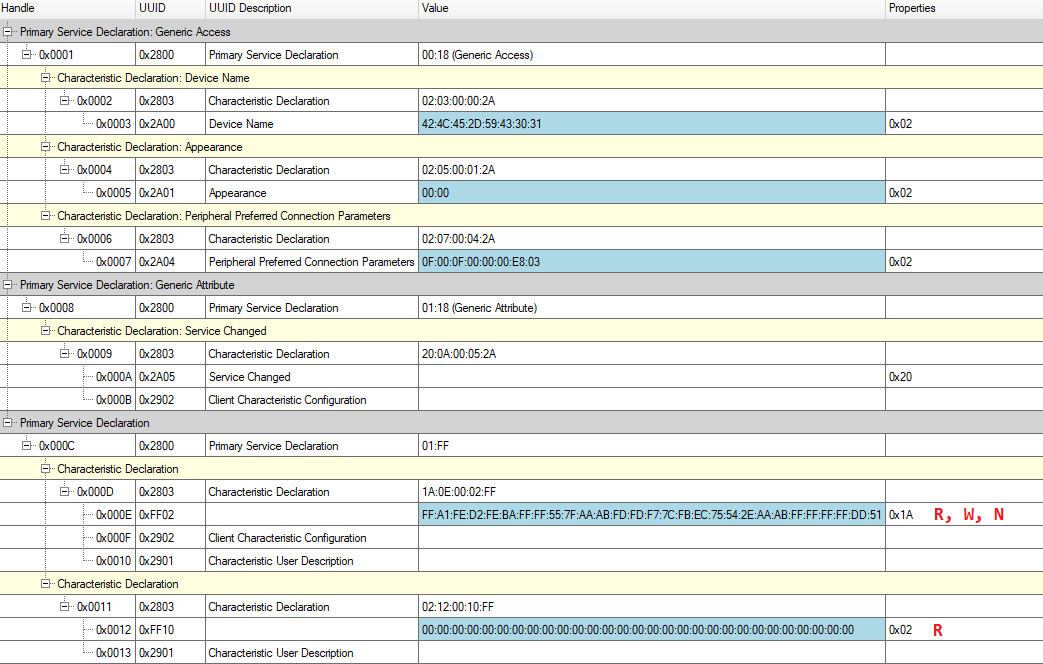
The application-related exchanges thus appear to rely on two characteristics:
0xFF02, which supports Read, Write and Notify
0xFF10, which supports Read
It’s useful to note the corresponding handles on the left side, because all exchanges at the GATT level are done using those handles as references to the type of data.
For 0xFF02, the useful handles are:
0x000E, containing data that can be read and written, and on which we can receive notification0x000F, which we can use to activate or disactivate notifications0x0010is not useful: it is a place to add a user-friendly description of the characteristic, but they have left it blank. It could have been deleted by the developers to save handles, or filled in with useful info.
For 0xFF10, the useful handles are:
0x0012: containing data that can be read.
We will now connect using the app and pay attention to activity around these particular handles.
Connecting through the app
We will now connect to the BLE-YC01 via the YINMIK Mobile Application, which was installed by scanning the following QRCode:
After installing the App, we simply open it and wait:
The application displays a default layout without any measurements
The application scans and connects to the first BLE-YC01 it detects
The layout changes to adapt to the data format of the BLE-YC01
Measurements are displayed on screen and are refreshed quite fast (about 2 measurements per second).
We force-close the application a few seconds later
Here is a dump of the Wireshark capture for the above sequence:
Wireshark - BLE-YC01 YINMIK App: Connect and Disconnect.
Since the application has the role of Master in the BLE Connection, it can choose the initial BLE Connection settings. Using Wireshark, we can observe the following parameters:
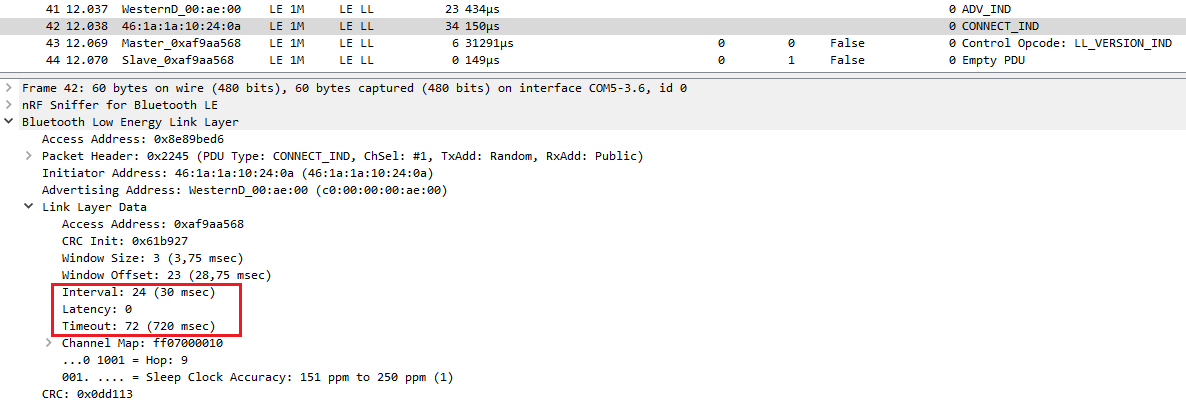
The connection interval of 30ms is a less energy-intensive mode than the connection that was established in the previous paragraph, where we used our own connection parameters as master.
Looking a bit closer at the PCAP file in Wireshark, we can observe the following behavior, keeping in mind to pay special attention to GATT Handles 0x000E, 0x000F and 0x0012, for reasons explained in the previous section.
After the initial connection, there is a service and characteristics discovery phase, followed by:
Packets 105 & 110: The Application activates notifications on 0xFF02 characteristic by writing 0x0001 to handle 0x000F
Packets 111 & 116 The Application re-reads this handle to ensure that it has been properly set
Packet 131: The Application writes
0b 02 16 09 1a 09 25 3a 1ato Handle0x000E(characteristic0xFF02). The Write response does not come immediately, but in packet 140, after the notification in packet 138.Packet 138: The BLE-YC01 sends a notification on Handle
0x000E, with the payloadff0016091a09253aecd5aaaaff55f7b3fbf87f5481aaaaffffffffdf05Packet 143: The application writes
01 02 00 00 00 03to Handle0x000E. Again, the write-response of this comes a bit later, in packet 152.Packet 150: The BLE-YC01 sends a notification on Handle
0x000E, with payloadfea1ffdaffee7fffbbd7fff05fffebfd75feae77fffaefff77ffef5d40
From that point on, the majority of the the remainding exchanges are in the form of Read Requests on Handle 0x000E:
Read Request on 0x000E
Read Response Example:
1e0004000bffa1fe72feffffff55570011aa02f7b0fbf8755406aabbffffffff5d44
This is done at 500ms intervals, to give the 2 measurements/second refresh rate that we observe on the screen.
Apart from the measurement updates done via read requests, we can observe:
A connection parameter update request handled in packets 461-464
Another write request on 0x000E followed by a notifications
Write:
02040006Notify:
f7a1fffafffffdfffefffdfffeffff5591027051babafffffffffff740